
Everyone loves to talk about ranking. But here’s what doesn’t get said enough:
👉 It’s not just about where your page shows up. It’s about what happens after the click.
Pages that meet all Core Web Vitals thresholds tend to have 20–30% lower bounce rates and longer session durations.
That’s not just good UX. That’s better conversion, retention, and yes, SEO that compounds over time. If your page loads slow, jumps around, or lags when someone tries to interact… they’re gone. And Google knows it.
What are Core Web Vitals?
Think of them as the three biggest silent deal-breakers for your users:
- Largest Contentful Paint (LCP) – how fast your main content shows up. (Target: < 2.5s)
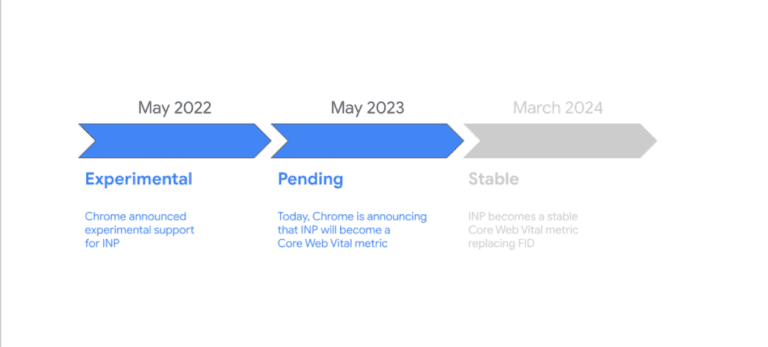
- Interaction to Next Paint (INP) – how quickly your page reacts to clicks. (Target: < 200ms)
- Cumulative Layout Shift (CLS) – how stable the layout is as things load. (Target: < 0.1)
If you’ve ever tapped the wrong button because the layout jumped… yep, that’s CLS ruining someone’s day.
Why should you care?
Because this is about more than performance scores.
- Great UX is great SEO. Google’s algorithm is increasingly behavior-driven. It rewards sites that keep users engaged.
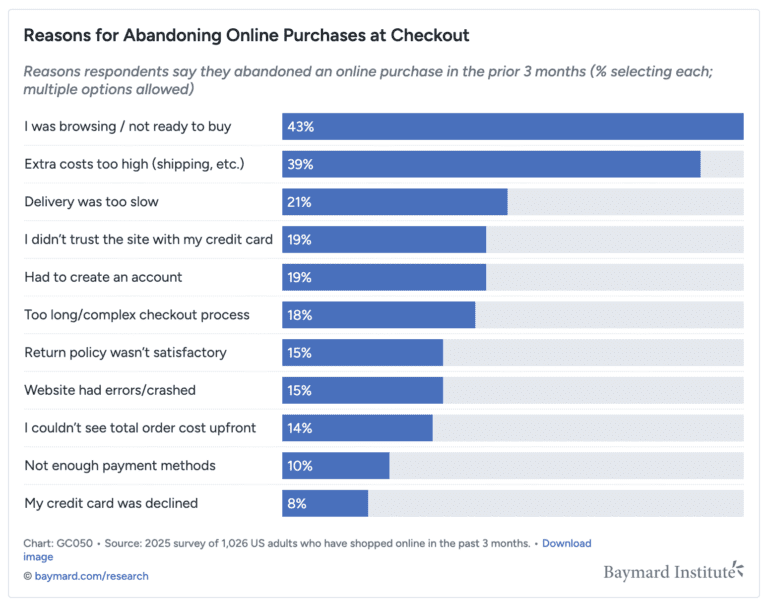
- You’re bleeding traffic you already paid for. You worked hard (or spent $$) to get that visitor. If they bounce before the page fully loads, that’s a wasted opportunity.
- It’s cheaper to fix than you think. Most CWV issues are fixable with smart prioritization, not massive rewrites.
How to Actually Fix It
1. Measure and benchmark
- Use PageSpeed Insights and Search Console to see where you stand.
Pull real data per page. Your homepage might be fine, but your blog or PDPs could be killing your metrics.
2. Prioritize ruthlessly
- Don’t chase every Lighthouse suggestion blindly.
- Focus on what’s hurting LCP and INP the most: unoptimized hero images, render-blocking CSS/JS, bloated animations, etc.
3. Use progressive enhancement
- Serve your critical content fast… and defer the fluff.
- That fancy animation or carousel? Load it after the essentials. Don’t let it block the message.
4. Monitor every week
- Set up automated checks. Tools like Search Console or even custom dashboards (👋 Germain UX can help here) let you spot regressions early.
- Every new release is a chance to improve… or break something.
👇 One last thing…
You can’t fix what you don’t feel. But your users do.
Core Web Vitals are how your site feels to the people you’re trying to help, convert, and retain.
You get one shot at a first impression. Make it fast, stable, and responsive. Watch every downstream metric quietly improve.
Germain UX helps teams go beyond the metrics and actually see what’s slowing down their digital experience in real time, on real sessions.
Monitor CWV, UX patterns, and backend bottlenecks (all in one place).
See what your users feel, before they bounce.
And improve your website with Germain’s powerful auto-resolution feature.