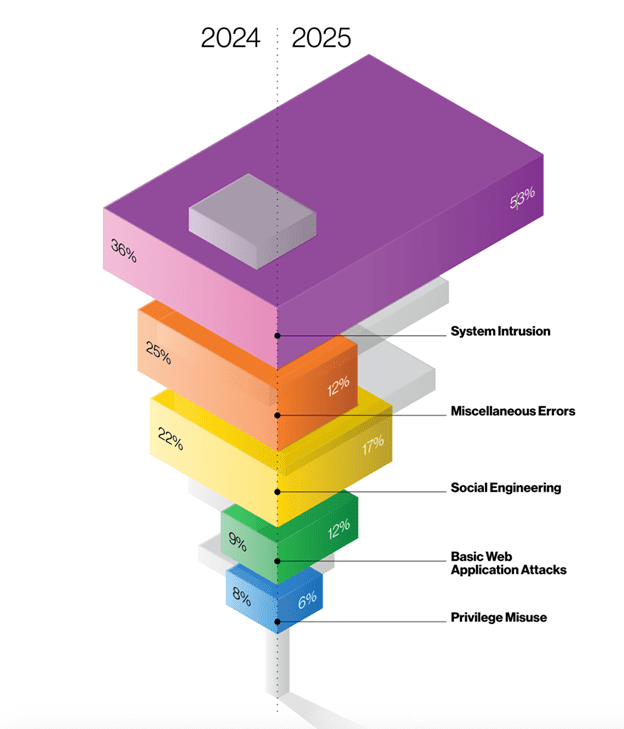
The Verizon 2025 Data Breach Investigations Report confirms what security teams already feel in their bones: humans remain the weakest link, accounting for roughly 60% of breaches. But buried in the SMB snapshot is a detail that should reshape how we think about multifactor authentication, an essential security measure: prompt bombing—the tactic where attackers flood users with MFA requests until they approve one out of exhaustion or confusion—now appears in 14% of Social Engineering incidents. Meanwhile, sophisticated MFA bypass techniques like adversary-in-the-middle (AiTM), password dumping, and SIM swapping together account for just 4% of breaches. Attackers often initiate a credential stuffing attack, using stolen credentials purchased from the dark web, as a precursor to MFA fatigue attacks.
The math is stark. For every technically sophisticated MFA bypass, there are 3.5 prompt-bombing attacks succeeding simply because users click “approve” to make the notifications stop. Attackers exploit user fatigue and trust in MFA prompts to succeed in bypassing MFA.
This threat model demands a counterintuitive UX response: Strategic friction beats frictionless flows when defending against human-targeting attacks. The industry’s decade-long pursuit of “seamless” authentication has inadvertently optimized for the attacker’s workflow. One-tap approvals that felt like good UX in 2018 now function as an express lane for credential-stuffing campaigns combined with notification spam.
The breach data tells a friction story
The Verizon DBIR data reveals the human element isn’t just about errors—it’s about decision fatigue under pressure. Prompt bombing works because:
- Volume overwhelms judgment: Attackers overwhelm users with excessive authentication requests, sending 20, 50, 100 push notifications in rapid succession.
- Approval becomes reflexive: The brain treats repeated authentication requests as legitimate requests, even when they may be malicious.
- “Make it stop” overrides “is this real”: Cognitive load from notification spam degrades threat assessment.
Attackers exploit the confusion between legitimate requests and malicious requests to trick users into approving access.
Attackers understand this. They’ve shifted from technically complex bypasses (4% of breaches) to psychologically simple patterns (14% of social engineering incidents) because the latter scales better and succeeds more reliably.
The response can’t be more seamlessness. It must be deliberate, context-rich friction that forces cognitive engagement exactly where attackers rely on automation.
Microsoft’s shift to secure defaults for push notifications: friction as feature
Microsoft’s approach to protecting authentication methods in Entra ID represents a watershed moment in acknowledging that friction prevents fatigue. Their December 2024 documentation on default enablement policies explicitly states that number matching—a 2-3 second friction pattern—is being enforced by default for Microsoft Authenticator push notifications specifically “in response to increasing MFA fatigue attacks.”
Number matching works because it breaks the attacker’s scalability advantage and ensures that the user must be actively engaged in the login process to complete the MFA challenge:
Without number matching:
- Attacker: Initiates 100 login attempts with stolen credentials
- User: Receives 100 push notifications
- User (fatigued): Taps “Approve” on notification #47
- Attacker: Gains access
With number matching:
- Attacker: Initiates 100 login attempts with stolen credentials
- User: Receives 100 MFA notifications, each requiring a unique code as part of the MFA challenge (e.g., “Is this you? Enter 73”)
- User: Cannot approve without seeing the number on the login screen during the login process
- Attacker: Cannot provide the number via notification alone
- Attack: Fails
The friction—typing two digits—forces the user to have eyes on both the authentication source (login screen) and the approval device (phone). This breaks prompt bombing because the attacker cannot provide the user with the matching number through push notifications alone.
Microsoft’s “Microsoft managed” settings framework allows the company to enable protections like number matching based on evolving threat landscapes. This acknowledges an uncomfortable truth: security teams need the ability to add friction without seeking permission from every stakeholder optimizing for conversion rates.
CISA’s hard line: eliminating fallback friction is product security
The December 2024 CISA Mobile Communications Best Practice Guidance goes further than recommending phishing-resistant authentication—it explicitly warns about the absence of friction around fallback methods:
“Once enrolled in authenticator-based MFA, disable SMS for each account. Enrollment in authenticator-based MFA does not automatically unenroll the account’s SMS. This can create a weak fallback mechanism.”
Disabling weak fallback methods is crucial for protecting critical systems and sensitive data from unauthorized access.
This is a product design mandate: The presence of a low-friction fallback (SMS) undermines the friction added by stronger methods (FIDO).
CISA’s position is unambiguous:
- Only FIDO authentication is phishing-resistant (hardware keys like Yubico/Google Titan, or FIDO passkeys)
- Authenticator codes are better than SMS but still vulnerable to phishing
- SMS is not phishing-resistant, not encrypted, and should be disabled entirely after FIDO enrollment
The guidance explicitly states: “While authenticator codes are better than SMS, they are still vulnerable to phishing; only FIDO authentication is phishing resistant.”
This creates a UX obligation: Teams must add removal friction to fallback paths. Making SMS the silent, automatic backup when FIDO fails is not user-friendly design—it’s an attack surface.
Four friction patterns that neutralize mfa fatigue attacks and prompt bombing
Based on the threat patterns in the 2025 DBIR and the defensive postures in Microsoft/CISA guidance, here are four friction patterns that directly counter human-targeting attacks. These friction patterns are specifically designed to address the risk of excessive push notification requests and the tactics attackers use in triggering MFA prompts, which are common methods used in MFA fatigue attacks.
Implementing these friction patterns is a proactive way to stop mfa fatigue attacks.
1. Number matching (2-second deliberation friction)
What it does: Displays a 2-digit number on the login screen; user must enter that number in the mobile app to approve the specific login request, ensuring the user is approving a legitimate authentication attempt.
What it prevents: Prompt bombing (user cannot approve without viewing the login source and verifying the login request)
UX cost: 2-3 seconds per authentication
Breach reduction: Directly targets the 14% of social engineering incidents using prompt bombing
Implementation: Microsoft Entra ID enforces this by default for Authenticator push notifications. Other MFA platforms (Duo, Okta, Google Workspace) offer similar “verification code” or “number challenge” options that should be enabled organization-wide.
2. Geographic and application context (1-second verification friction)
What it does: Displays location and application name in push notification (e.g., “Sign-in request from Salesforce in San Francisco, CA”) and provides additional context to help users verify the legitimacy of authentication attempts. What it prevents: Credential stuffing from unexpected locations/apps UX cost: 1 second to read context Breach reduction: Helps users identify anomalous login attempts before approval
Implementation: Microsoft’s “Microsoft managed” settings currently have location and application name in notifications set to “Disabled,” but admins can explicitly enable these. Other MFA providers (Duo, Okta) offer similar contextual notification features.
3. Rate limiting with progressive delay (adaptive friction)
What it does: First failed attempt = immediate retry; second = 10-second delay; third = 60-second delay; fourth = account lockout + security team alert What it prevents: High-volume prompt bombing campaigns UX cost: Zero for legitimate users (single attempts succeed); exponential for attackers Breach reduction: Makes prompt bombing campaigns non-viable at scale
Implementation: Configure at MFA provider level (not just at application level). Duo’s “Adaptive Authentication” and Okta’s “ThreatInsight” include intelligent rate limiting. Microsoft Entra ID’s “Smart Lockout” provides similar functionality. Rate limiting and alerting also help detect MFA fatigue attacks by identifying abnormal authentication patterns.
4. Removing SMS fallback entirely (negative friction)
What it does: After FIDO enrollment, disable SMS/voice call fallback; require FIDO + recovery codes for account access. This strengthens the security of user accounts by removing a common vector for social engineering attacks.
What it prevents: Attackers downgrading to weaker auth method via social engineering (help desk calls, account recovery flows)
UX cost: Requires users to manage recovery codes or enroll backup FIDO credentials
Breach reduction: Eliminates the phishable fallback that undermines FIDO protection
Implementation: CISA guidance is explicit: “Once enrolled, disable SMS for each account. Enrollment in authenticator-based MFA does not automatically unenroll the account’s SMS.” This requires explicit configuration in most MFA systems—enrollment in FIDO/Authenticator does not automatically remove SMS as a fallback, so administrators must ensure SMS fallback is disabled for all user accounts.
Behavioral analytics: the silent ally in detecting MFA fatigue
While adding smart friction to the authentication process is essential, the next frontier in stopping MFA fatigue attacks is letting your security systems think for themselves. Enter behavioral analytics—the silent, always-on ally that watches for the subtle signs of MFA bombing and credential abuse, even when users are too overwhelmed to notice.
Behavioral analytics works by continuously monitoring user behavior across every login attempt, authentication request, and push notification. Instead of treating every MFA prompt as equal, it looks for unusual access patterns: a sudden spike in repeated MFA requests, login attempts from new locations, or a flurry of MFA push notifications at odd hours. These are the digital fingerprints of an MFA fatigue attack in progress.
When behavioral analytics detects suspicious activity—like a user receiving dozens of authentication prompts in rapid succession, or login attempts from devices and geographies that don’t match their normal profile—it can trigger adaptive authentication. This means the authentication system automatically steps up the challenge: requiring biometric authentication methods (like fingerprint or facial recognition), demanding a hardware security key, or even temporarily locking the account and alerting security teams. By tailoring the authentication factors to the risk, organizations can prevent MFA fatigue attacks before attackers gain unauthorized access.
But technology alone isn’t enough. MFA fatigue attacks rely on overwhelming users with push notifications until they approve one out of habit or confusion. That’s why a robust security awareness training program is critical. Educating users about the dangers of MFA spamming, the importance of scrutinizing every MFA prompt, and how to report suspicious activity empowers them to be the first line of defense. When users understand that repeated MFA requests or unexpected authentication prompts are red flags—not just annoying glitches—they’re less likely to fall for MFA bombing attacks.
Hardware security keys add another layer of protection, making credential stuffing attacks and social engineering tactics far less effective. Combined with risk-based authentication and behavioral analytics, they create a multi-factor authentication (MFA) environment that adapts to both user behavior and emerging threats.
In short, behavioral analytics transforms your authentication system from a static gatekeeper into a dynamic, context-aware guardian. By detecting and responding to suspicious login attempts, repeated MFA requests, and unusual access patterns in real time, security teams can mitigate MFA fatigue attacks before they succeed. Pair this with ongoing user education and adaptive authentication, and you have a security strategy that’s proactive, resilient, and ready for whatever attackers try next.
The “seamless” trap: when friction removal increases breach risk
The industry’s optimization for frictionless authentication was well-intentioned. Long MFA flows decrease productivity, increase support tickets, and frustrate users. But the threat model has evolved faster than the UX strategy.
Prompt bombing succeeds because MFA is frictionless. One-tap approvals, auto-approvals after device recognition, and SMS fallbacks all prioritize completion rates over threat mitigation. This made sense when MFA bypass required technical sophistication (AiTM attacks, SIM swapping). It’s catastrophic when 14% of social engineering incidents succeed via notification spam.
Consider the breach paths:
Frictionless MFA (one-tap push notification):
- Attacker obtains credentials from infostealer malware (30% of compromised systems had corporate credentials per Verizon DBIR)
- Attacker attempts login
- User receives push notification with “Approve” button
- User, trained by years of one-tap UX, approves reflexively
- Threat actors use mfa attacks to exploit user habits, manipulating employees through social engineering tactics such as phone calls or repeated notifications.
- Attacker gains access
- Median time to breach: seconds
- A successful mfa fatigue attack occurs when the attacker is able to bypass multi-factor authentication by overwhelming the user with repeated prompts, leading to unauthorized access, data theft, or security breaches.
Friction-rich MFA (number matching + no SMS fallback):
- Attacker obtains credentials from infostealer malware
- Attacker attempts login
- User receives push notification requiring number match
- User cannot approve without viewing login screen
- User (not attempting to log in) denies request
- Attacker initiates 50 more attempts (prompt bombing)
- Rate limiter triggers after attempt 3, imposes 60-second delays
- After attempt 10, account locks, security team alerted
- Attacker cannot downgrade to SMS (disabled after FIDO enrollment)
- These measures are designed to prevent mfa attacks by threat actors, reducing the risk of credential theft and unauthorized access.
- Median time to breach: never
Metrics shift: from completion rate to breach prevention rate
Teams implementing strategic friction will face pushback framed around “user experience.” The arguments are predictable:
- “Number matching adds 2-3 seconds to every login”
- “Disabling SMS will increase help desk calls”
- “Rate limiting will lock out legitimate users who mistype passwords”
These concerns optimize for the wrong metric. The correct metric is: What percentage of authentication attempts are vulnerable to human-targeting attacks?
Verizon’s data provides the benchmark:
- 60% of breaches involve the human element
- 14% of social engineering incidents use prompt bombing
- 88% of SMB breaches involve ransomware (which frequently begins with credential abuse + MFA bypass)
If adding 2-3 seconds of deliberation friction per login reduces prompt-bombing success rates by even 50%, the ROI is:
- Cost: 2-3 seconds × daily authentications
- Benefit: 7% reduction in social engineering incident success rate (50% of 14%)
- Applied to 60% human-element breaches: 4.2% overall breach rate reduction
A key outcome of effective MFA fatigue prevention is the protection of customer data, as reducing breach rates directly limits unauthorized access to sensitive information.
For SMBs where ransomware hits 88% of breaches, and ransomware campaigns rely on credential stuffing + MFA fatigue, the ROI is even starker.
Implementation checklist: Adding friction and user education that defeats fatigue
Phase 1: Enable secure defaults (Weeks 1-2)
- These steps are essential security measures for organizations to prevent mfa fatigue and strengthen authentication.
- Enable number matching for all push notification MFA (Microsoft Authenticator, Duo, Okta)
- Enable location and application context in MFA notifications
- Configure rate limiting: 3 failed attempts = account review, 5 = temporary lockout
- Audit which accounts still have SMS enabled as fallback
- Configuring security mfa is a critical part of this process to ensure robust protection against fatigue attacks.
Phase 2: Transition away from SMS (Weeks 3-8)
- Launch FIDO enrollment campaign (hardware keys for high-risk users, passkeys for general workforce)
- After FIDO enrollment confirmed, disable SMS fallback per account
- Distribute recovery codes and require storage in password manager
- Update account recovery flows to require FIDO + recovery code (no SMS bypass)
Phase 3: Monitor and iterate (Ongoing)
- Track metrics: MFA denial rate (should increase as users spot illegitimate prompts), help desk calls for locked accounts, FIDO adoption rate, SMS fallback usage (should trend to zero)
- Identify high-volume MFA prompt users (potential prompt bombing targets)
- Require step-up authentication for sensitive operations even after initial MFA (e.g., wire transfers, admin access, API key generation)
Phase 4: Remove weakest fallbacks entirely (Months 3-6)
- For accounts that successfully used FIDO for 30+ days, disable SMS entirely (no fallback)
- Require FIDO + 2FA recovery code for account recovery
- Implement in-person identity verification for recovery if FIDO device lost + recovery codes lost
- Accept that this friction prevents credential-stuffing campaigns from ever succeeding, even with stolen passwords
The non-obvious conclusion
Teams that add 2-3 seconds of deliberate, context-rich friction (number matching, geographic/app context, sane push-rate limits, no SMS fallback) will outperform “frictionless” MFA on breach reduction metrics—even if short-term completion rates dip—because they directly neutralize the specific human-targeting patterns highlighted in recent breach data. This friction-based authentication approach directly counters social engineering attacks that exploit user fatigue, such as those seen in MFA fatigue attacks.
The Verizon DBIR shows attackers succeeding via prompt bombing at 3.5× the rate of technical MFA bypasses. CISA’s guidance explicitly warns that SMS fallbacks undermine FIDO protection. Microsoft is enforcing number matching by default despite the added friction.
The strategic insight: Friction is not the enemy of good UX in authentication; it’s the mechanism that forces attackers back to the 4% of breaches requiring technical sophistication, away from the 14% succeeding via notification spam and social engineering attacks.
When security teams present friction as a feature—“This 2-second number match just prevented a prompt-bombing attack on your account”—users understand the value exchange. When framed as “seamless,” users assume one-tap is always safe, and prompt bombing succeeds.
The industry needs to stop chasing seamless and start engineering deliberate. Because in 2025, the data is clear: small, smart frictions beat MFA fatigue better than zero friction ever could.