Your checkout page isn’t broken because it needs more A/B tests. It’s broken because it still does the same things that have driven shoppers away for a decade.
The average cart abandonment rate sits at 70.19% across industries, according to Baymard Institute’s 2025 research. That means seven out of ten people who add items to their cart will leave without buying. The instinct is to treat this as a mystery requiring endless experimentation. But the data tells a different story: the reasons people abandon carts are well-documented, repetitive, and solvable.
Baymard’s latest checkout UX audit of the top 60 US and European e-commerce sites reveals that the average large-scale checkout flow still contains 34 usability issues. These aren’t edge cases or theoretical problems. They’re friction points that directly correlate with revenue loss, and most sites haven’t fixed them. Poor checkout performance and lack of mobile optimized experiences can significantly undermine checkout efficiency, leading to higher abandonment rates and lost revenue.
The problem isn’t that we don’t know what’s wrong. It’s that teams keep treating checkout optimization as a creative exercise instead of addressing a ranked backlog of known conversion killers.
Introduction to Checkout Friction
Checkout friction is the collection of obstacles and slowdowns that customers encounter on the checkout page during online shopping. These friction points—ranging from confusing checkout forms to unexpected steps—can disrupt the customer journey and derail the buying experience. For e-commerce businesses, even minor checkout friction can have major consequences: higher cart abandonment, lower conversion rates, and ultimately, lost revenue.
A complicated checkout process doesn’t just frustrate customers; it actively drives them away. When shoppers face lengthy forms, unclear instructions, or poorly optimized mobile experiences, they’re more likely to abandon their carts and less likely to return. In today’s competitive e-commerce landscape, reducing checkout friction is essential for improving customer satisfaction and ensuring that more shoppers complete their purchases. By identifying and addressing these pain points, businesses can create a smoother, more enjoyable buying experience that keeps customers coming back.
Understanding Customer Journeys
The customer journey in e-commerce is a series of interconnected steps, from initial product discovery to the final checkout. Each stage presents opportunities—and risks—for friction points to emerge. Even a small hiccup in the checkout process, such as confusing address fields or unclear shipping address requirements, can disrupt the flow and cause customers to reconsider their purchase.
A seamless customer journey depends on a checkout process that is intuitive, efficient, and free of unnecessary barriers. E-commerce platforms that prioritize the user experience by streamlining address fields, simplifying payment steps, and minimizing distractions are more likely to keep customers engaged through to the end. By mapping out the entire customer journey and pinpointing where friction occurs, e-commerce businesses can implement targeted improvements that enhance the buying experience and increase the likelihood of a completed checkout.
The Real Drivers of Abandonment
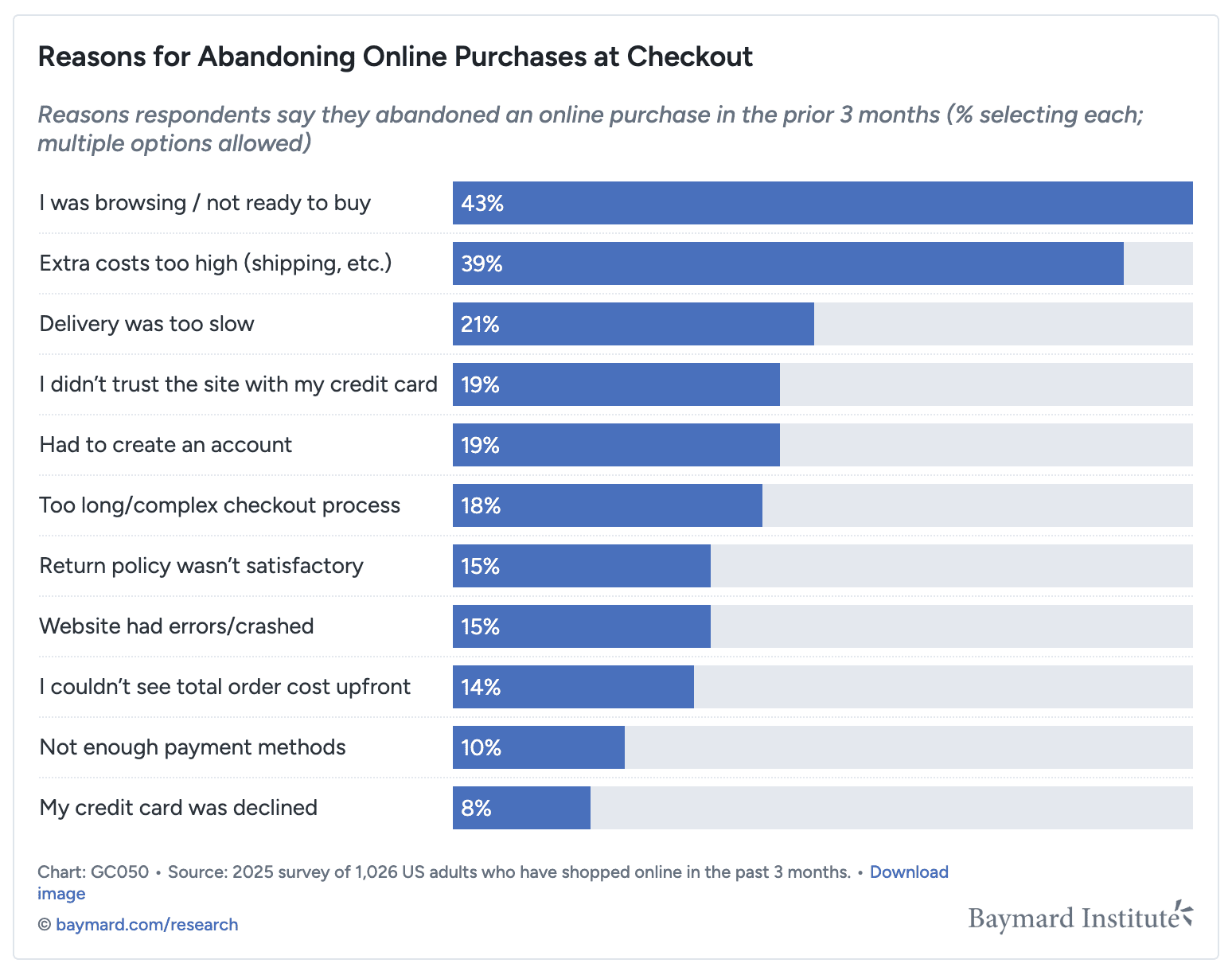
When Baymard asked shoppers why they abandoned their carts, the answers weren’t vague. They were specific, actionable, and consistent:
48% abandoned because extra costs (shipping, taxes, fees) were too high
24% left because the site wanted them to create an account
22% found the checkout process too long or complicated
18% didn’t trust the site with their credit card information
17% encountered errors or the site crashed
16% said the delivery was too slow
13% couldn’t see or calculate total order costs upfront
12% had an unsatisfactory returns policy
9% didn’t find enough payment methods
4% said the card was declined
For e-commerce businesses, every abandoned cart by online shoppers represents a potential customer lost—a lost sale that, when multiplied across many transactions, is silently draining revenue.
These aren’t hypothetical friction points. They’re documented blockers, and they’re what your checkout audit should prioritize.
Stop Optimizing Broadly. Start Fixing Systematically.
Most checkout optimization efforts fail because they treat every issue with equal weight. A button color change gets the same resources as addressing forced registration. A hero image rotation gets more attention than fixing error messaging.
But not all friction is created equal. The issues that drive abandonment at scale are the ones that should dominate your roadmap. Analyzing user behavior helps identify which friction points create the highest perceived effort and psychological friction, leading to increased abandonment rates.
Here’s what a friction-ranked backlog looks like:
1. Cost Surprises (48% of abandoners)
The problem: Shoppers reach checkout and discover unexpected shipping fees, taxes, or handling charges that weren’t surfaced earlier in the journey.
Why it matters: This is the single biggest driver of abandonment. Nearly half of all cart abandoners cite this as their reason for leaving.
The fix:
Display shipping costs on product pages or earlier in the flow
Show estimated taxes before checkout begins
Offer a shipping calculator on cart pages
Never hide fees until the final step
Baymard found that sites with transparent pricing early in the flow see measurably higher conversion. The inverse is also true: sites that delay cost disclosure until payment lose buyers in droves.
2. Forced Account Creation (24% of abandoners)
The problem: Requiring shoppers to register before they can buy introduces unnecessary steps, cognitive load, and privacy concerns.
Why it matters: One in four abandoners walks away specifically because they don’t want to create an account.
The fix:
Offer guest checkout as the default path
Make account creation optional and post-purchase
If you must ask for registration, explain the value (order tracking, faster future checkouts, exclusive perks)
Baymard’s audit shows that 56% of sites still require account creation or make guest checkout difficult to find. This is low-hanging fruit that costs conversions daily.
3. Complex or Long Checkout Flows (22% of abandoners)
The problem: Checkouts that span multiple pages, ask for redundant information, or require excessive form fields increase friction and drop-off.
Why it matters: More than one in five shoppers abandon because the process feels like work.
The fix:
Use a single-page or accordion-style checkout when possible
Remove optional fields entirely; don’t just mark them as optional
Autofill and autocomplete wherever feasible (address lookup, browser autofill), and implement correct keyboard triggers (such as numeric keypads for zip codes) to streamline data entry, especially for mobile users
Show progress indicators if multi-step flows are unavoidable
The best-performing checkouts prioritize information architecture over aesthetic polish. Every additional field and every extra page is a tax on conversion. Checkout fields should be designed to be mobile-friendly, ensuring a seamless experience for mobile users by optimizing for touch interactions, responsive layouts, and easy data entry.
4. Trust and Security Concerns (18% of abandoners)
The problem: Shoppers don’t feel safe entering payment information because trust signals are weak or absent.
Why it matters: Nearly one in five abandoners cite this as their reason for leaving. Trust isn’t optional—it’s foundational.
The fix:
Display security badges and SSL indicators prominently
Use recognizable payment providers (Stripe, PayPal, Apple Pay)
Include customer reviews, testimonials, or trust seals
Clearly state your privacy and data protection policies
Avoid asking for information that feels unnecessary (e.g., phone number when email suffices)
Baymard’s research emphasizes that perceived security matters as much as actual security. If shoppers don’t see visible proof that their data is safe, they won’t proceed. Visible trust signals and secure processes are essential for maintaining brand trust during checkout, as any friction or uncertainty can erode customer confidence and harm your reputation.
5. Errors and Crashes (17% of abandoners)
The problem: Technical failures, unclear error messages, or form validation issues stop shoppers in their tracks.
Why it matters: Errors don’t just frustrate users—they obliterate trust. When a checkout fails, most shoppers don’t retry.
The fix:
Implement inline validation so users catch errors before submitting
Write clear, specific error messages (not “Invalid input” but “Please enter a 5-digit ZIP code”)
Test across devices, browsers, and payment methods obsessively
Monitor error logs and address spikes immediately
Provide fallback options when primary payment methods fail
Baymard found that poor error messaging is one of the most common yet most fixable issues. If your checkout throws vague errors or requires users to hunt for what went wrong, you’re actively driving them away.
6. Slow Delivery (16% of abandoners)
The problem: Estimated delivery dates are too far out, or shipping options don’t match shopper urgency.
Why it matters: In a world of Amazon Prime expectations, slow delivery is a dealbreaker.
The fix:
Show estimated delivery dates on product pages and at checkout
Offer multiple shipping speed options (standard, expedited, overnight)
Be transparent about fulfillment timelines; don’t overpromise
Consider free shipping thresholds to offset concerns
Clearly explain why you collect contact information at checkout, such as for providing delivery updates, to build trust and transparency
While you can’t always control logistics, you can control how and when you communicate delivery timelines. Shoppers are more forgiving of longer waits when they know upfront.
7. Hidden Total Costs (13% of abandoners)
The problem: Shoppers can’t see the full order total until the final payment screen, which creates uncertainty and distrust.
Why it matters: Even if costs aren’t inflated, hiding them feels manipulative.
The fix:
Display a running order summary on every checkout page
Break down line items clearly: subtotal, shipping, taxes, discounts, total
Sticky or sidebar summaries keep the total visible as users scroll
Baymard emphasizes that total transparency in pricing isn’t just good UX—it’s a direct conversion lever. Sites that hide totals until the last second lose buyers who feel baited and switched.
8. Weak Return Policies (12% of abandoners)
The problem: Return policies are buried, unclear, or restrictive, which makes shoppers hesitant to commit.
Why it matters: One in eight abandoners cites this as a blocker, especially for higher-ticket items or first-time buyers.
The fix:
Make your return policy visible and easy to find at checkout
Offer hassle-free returns when possible
Clearly state timelines, conditions, and processes
Consider free return shipping as a competitive advantage
Returns are a cost center, but they’re also a trust builder. Shoppers who know they can return items are more likely to buy in the first place, and hassle-free returns not only build trust but also help convert first-time buyers into loyal customers.
9. Limited Payment Options (9% of abandoners)
The problem: Shoppers reach checkout and find their preferred payment method isn’t supported.
Why it matters: Nearly one in ten abandoners leaves because they can’t pay the way they want.
The fix:
Accept major credit cards, debit cards, and digital wallets (Apple Pay, Google Pay, PayPal)
Consider buy-now-pay-later options (Klarna, Afterpay, Affirm) for higher-priced items
Localize payment options for international audiences (Alipay, iDEAL, etc.)
Payment flexibility isn’t about accommodating every niche method—it’s about covering the most common preferences in your market.
10. Card Declines (4% of abandoners)
The problem: Legitimate transactions are declined due to overly aggressive fraud detection or technical issues.
Why it matters: While 4% seems small, these are shoppers who wanted to buy and were blocked at the last step. That’s pure revenue loss.
The fix:
Work with payment processors to reduce false declines
Provide clear messaging when declines happen, with next steps
Offer alternative payment methods as fallback
Allow shoppers to retry with a different card easily
Card declines are often outside your control, but how you handle them is entirely within it. Don’t let a technical hiccup feel like a dead end.
The Importance of Customer Feedback
Customer feedback is a powerful resource for uncovering friction points in the checkout process. By actively seeking out and listening to customer feedback—through surveys, reviews, and exit intent pop-ups—e-commerce businesses can gain firsthand insights into the challenges and frustrations customers face during the buying process.
This feedback provides a direct line to the customer’s perspective, highlighting specific areas where the checkout process may be causing confusion or delay. By analyzing this information, businesses can prioritize changes that will have the greatest impact on customer satisfaction and reduce friction throughout the checkout. A customer-centric approach to checkout optimization, driven by real feedback, not only improves the buying process but also builds trust and loyalty among customers. In a crowded e-commerce market, those who listen and respond to customer feedback are best positioned to reduce cart abandonment and drive long-term success.
The Baymard Benchmark: What Good Looks Like
Baymard’s 2024 audit found that only 8% of sites achieved a “Good” or “Acceptable” checkout experience. The remaining 92% still had significant, fixable issues.
The gap between average and best-in-class isn’t creativity. It’s execution on known problems.
Sites that address the top friction drivers see measurable results:
Reducing cost surprises increases checkout completion
Offering guest checkout lifts conversion by double digits
Simplifying forms and flows reduces drop-off at every step
Trust signals and clear error messaging rebuild confidence
Improving checkout performance and checkout efficiency not only boosts customer satisfaction and operational metrics, but also enables more users to complete checkout successfully, reducing abandonment and increasing throughput.
This isn’t speculative. It’s what happens when you fix the documented issues instead of chasing novelty.
Measuring Success and Conversion Rates
Tracking the right metrics is essential for understanding the effectiveness of your checkout optimization efforts. Key metrics such as cart abandonment rates, checkout completion rates, and overall conversion rates provide a clear picture of how well your checkout process is performing. By monitoring these numbers, e-commerce businesses can quickly identify friction points that are causing customers to drop off before completing their purchase.
Integrating streamlined payment options like Google Pay and Apple Pay can further reduce friction in the payment process, making it easier for customers to complete their transactions. Regularly analyzing these key metrics allows businesses to refine their checkout strategies, address problem areas, and enhance the overall customer experience. In the fast-paced world of e-commerce, continuous measurement and optimization are crucial for reducing cart abandonment, improving conversion rates, and staying ahead of the competition.
How to Build Your Friction Backlog
A comprehensive checkout friction audit is essential for optimizing your entire e-commerce platform. By ensuring the checkout experience is tailored to your target audience and does not test customer patience, you can reduce friction, improve user satisfaction, and boost conversions.
Here’s the framework for auditing your own checkout:
1. Map your current checkout flow step-by-step Document every page, field, button, and decision point. Include error states and edge cases.
2. Cross-reference against the top 10 abandonment drivers Go through each issue in order of severity. Mark where your checkout introduces friction, especially points that test customer patience.
3. Run qualitative and quantitative diagnostics
Heatmaps and session recordings: Where do users hesitate, rage-click, or drop off?
Exit surveys: Ask abandoners directly why they left
Analytics: Identify the specific steps with the highest drop-off rates
4. Prioritize fixes by impact and effort Rank issues by how many users they affect and how difficult they are to resolve. Start with high-impact, low-effort wins.
5. Measure before and after Track conversion rate, abandonment rate, and revenue per visitor. Test one fix at a time when possible to isolate impact.
The Bottom Line
Checkout optimization isn’t a mystery. The reasons people abandon are well-researched, and the fixes are proven.
The question isn’t “What should we test?” It’s “Why haven’t we fixed the things we already know are broken?”
Stop treating your checkout like a creative project. Treat it like a backlog. Rank the friction. Fix the worst offenders first. Measure the impact. Move to the next issue.
Because the difference between 70% abandonment and 50% abandonment isn’t a better design system. It’s removing the cost surprises, the forced registrations, the complexity, the trust gaps, and the errors that Baymard has been documenting for years.
Your shoppers have already told you what’s wrong. Now it’s time to listen. The goal is to guide every customer smoothly to the finish line—completing their purchase—because every abandoned cart is a lost sale.
Sources:
Baymard Institute. (2025). 50 Cart Abandonment Rate Statistics 2026. https://baymard.com/lists/cart-abandonment-rate
Baymard Institute. (2024). Checkout UX Best Practices 2025 (Current State of Checkout UX). https://baymard.com/blog/current-state-of-checkout-ux